Lineup Builder Update:Pro Steps, the Best Possible Team and Stand-ins
The Lineup Builder shows your Pro step and its target, the Auto Builder finds the best team a board's rules allow (up to 20 points more in Gameweek 21), All Players works with stand-ins and the NBA builder works like football.
The Lineup Builder got a round of updates in two days. It shows your Pro step and the step's target, the Auto Builder now finds the best team a board's rules allow, All Players works with stand-ins, you choose whether the Auto Builder uses PS or PS Q80, and the NBA builder works like the football one.
The Auto Builder finds the best team
The Auto Builder used to search within a fixed budget. On large card pools and on boards with a cap it stopped early and kept the best team it had found up to then. It now considers every team the board's rules allow and returns the one with the highest projected score. It never returns a worse team than before.
I compared the old and the new Auto Builder on 12 October with all Limited players (All Players) of Gameweek 21 on 37 boards:
| Gameweek 21, Limited, All Players | Before | Now |
|---|---|---|
| Boards where the search stopped early | 23 of 37 | 0 of 37 |
| Boards with a better team | – | 13 of 37 |
| Boards with a worse team | – | 0 of 37 |
| Average gain on the 19 boards with a cap | – | +6.2 points |
| All Star Arena Cap 220 | 345.8 | 365.8 |
| All Star Arena | 366.1 | 382.2 |
| Contender | 336.0 | 351.8 |
| Under 23 Arena | 350.4 | 361.4 |
| MLS Arena | 344.2 | 354.6 |
With your own cards, the difference shows on large galleries and on teams you cannot fill completely:
- In a gallery of about 1,600 Limited cards, the old search stopped on the All Star Arena boards after 20 seconds at 379 points. The new one finds 390 points in under 10 seconds.
- On boards with an In-Season minimum, a team you cannot complete now gets as many cards as the rules allow. In the test, a Ligue 1 team went from 0 to 4 cards and an Eredivisie team from 1 to 4.
Because every card now counts, a build on a very large pool takes a few seconds: on my test computer up to about three seconds with All Players and up to about eight with the 1,600-card gallery.
NBA: the best team in a fraction of a second
On all nine NBA boards the Auto Builder returns exactly the best team, checked against a complete calculation. With your own cards, a typical build on my test computer took 0.1 seconds instead of 2.3, the slowest board 0.5 seconds instead of 7.3. No build reached the time limit any more, so the note "Best lineup found within the search budget" no longer appeared.
All Players: one stand-in per player
All Players now lists every player once in the board's rarity, as a stand-in. Before, some players appeared twice. A stand-in is not one of your cards, so the same player can play in every team of every board, for example Messi in four MLS and four All Star teams. Your own cards still play in one team at a time.
Build with PS or PS Q80
If you show both projections (Settings > Preferences > Projected Score: Average and Ceiling (Q80)), the Auto Builder settings of each team let you choose which one it builds with: PS or PS Q80. The auto captain, the team total, the Pro step target and the team image export follow your choice.
The NBA Lineup Builder works like football
- The Match Status filter works as in football: a player counts with his first game of the gameweek.
- The competition menu shows your saved lineups against Sorare's entry limit, the entry deadline and a link to the board on Sorare.
- The arena rooms carry Sorare's names, in Sorare's order: Contender, Champion, Uncapped, U23 and Veterans.
Your step next to the competition
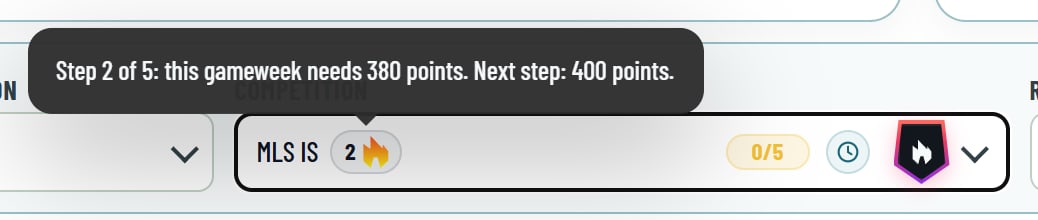
Open Pro > Lineup Builder in Pro mode. Every Pro competition in the list shows your current step with Sorare's flame. The number is the step you are on, counting from 1. The flame is grey on the first step and lights up from the second.
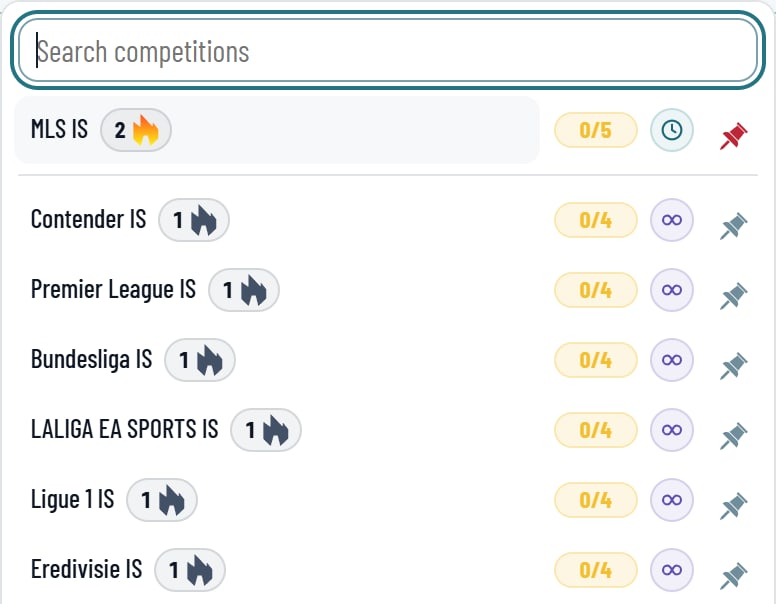
Hover the step for the details: which step out of how many, the points this gameweek needs and the target of the next step.
On every Pro board
- Pro career boards show the step you are on, straight from your Sorare account.
- MLS and K1 League still run as Sorare leaderboards with point thresholds. They show your streak on those thresholds the same way, with the same flame.
- In-Season competitions you play on a league's Pro board show that board's step.
Your steps come from your connected Sorare account and refresh every 30 minutes. Without a connected account, the builder works as before, just without steps.
The target above each team
Each team now shows Target next to L10, IS and PS: the points your step needs this gameweek. It turns green once the team's projected score reaches it and stays red below, so you see right away whether a card swap gets the team there.
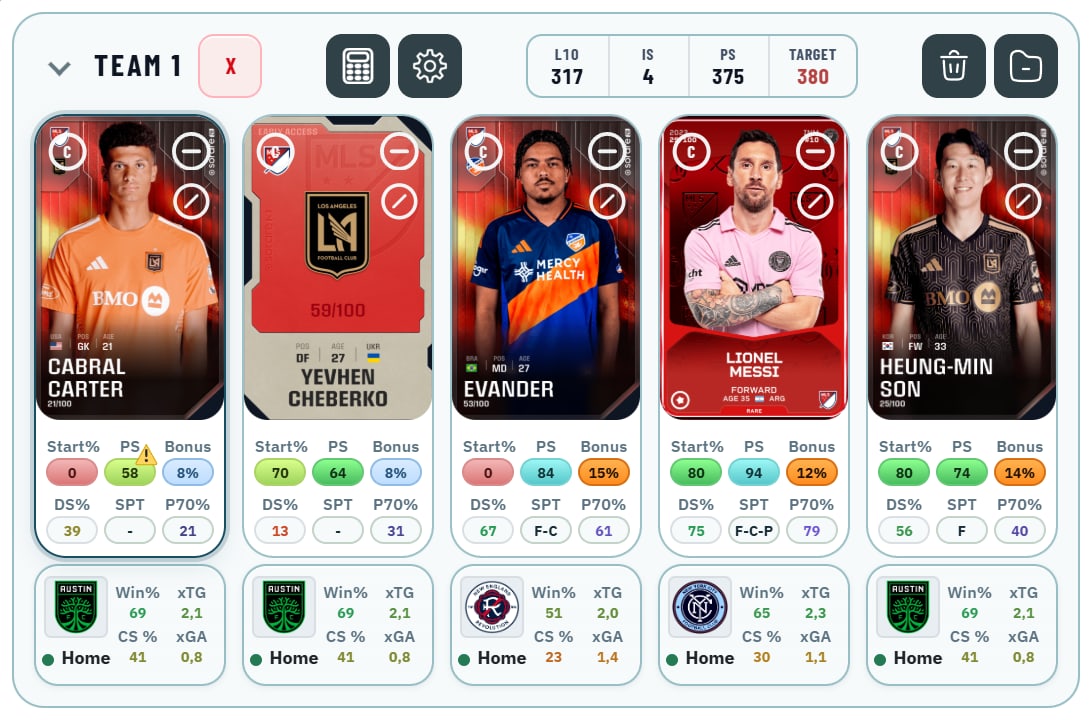
The target is also part of the team image export.
The rules of your step
Where a Pro board's rules change from step to step, the Lineup Builder and the Auto Builder use the rules of the step you are on. This now also applies when you build by time horizon instead of by gameweek.
If a step still looks wrong after half an hour, let me know.