The SoProb Extension Now Covers NBA:Card Values and Lineup Import
The browser extension now works on Sorare's NBA pages: minutes, projected points, ceiling and Value on every NBA card, your saved SoProb lineups imported in one click, and a popup switch between Football and NBA.
The SoProb browser extension now covers NBA. On Sorare's NBA pages every card shows the minutes, the projected points, the ceiling and the Value of the player's best game this gameweek, a saved team from the SoProb NBA Lineup Builder goes into a Sorare lineup in one click, and the popup switches between Football and NBA.
The values on every NBA card
Each value belongs to the player's best game of the gameweek, the game Sorare scores, just like in the NBA Player DB:
| Badge | What it shows |
|---|---|
| MIN | The minutes he is expected to play in his best game, on the left of the card |
| PP | The projected points of that game |
| Q80 | A high but realistic score: he reaches or beats it in about one gameweek in five |
| VAL | His Value: how far his projected points with the card bonus lie above or below his L10 at the gameweek's deadline, or his star range, as chosen under Settings > Preferences > NBA > Value |
- The cards show the next gameweek that has not started yet. On a Sorare page that names its gameweek, such as a board of the Arena, the values follow that gameweek.
- A player without any projection this gameweek, deep on the bench or ruled out, shows grey dashes instead of numbers.
- When Sorare shows a status like GTD or OUT in the corner of a card, the values move below it.
- In the Lineups tab each card shows one pill with its PP, or its Q80 when Projected Points is set to the ceiling.
The colours
PP and Q80 follow Sorare's own NBA colours, the minutes the scale of the NBA tabs:
| Colour | PP and Q80 | Minutes |
|---|---|---|
| Red | Up to 4 | 0 |
| Orange | 5 to 14 | Under 12 |
| Yellow | 15 to 24 | 12 to 23 |
| Lime | 25 to 34 | 24 to 29 |
| Green | 35 to 49 | 30 to 35 |
| Turquoise | 50 to 74 | 36 and more |
| Pearl | 75 and more |
Value is red below zero and green above it, the stronger the further it lies from zero.
Import a saved team into Sorare
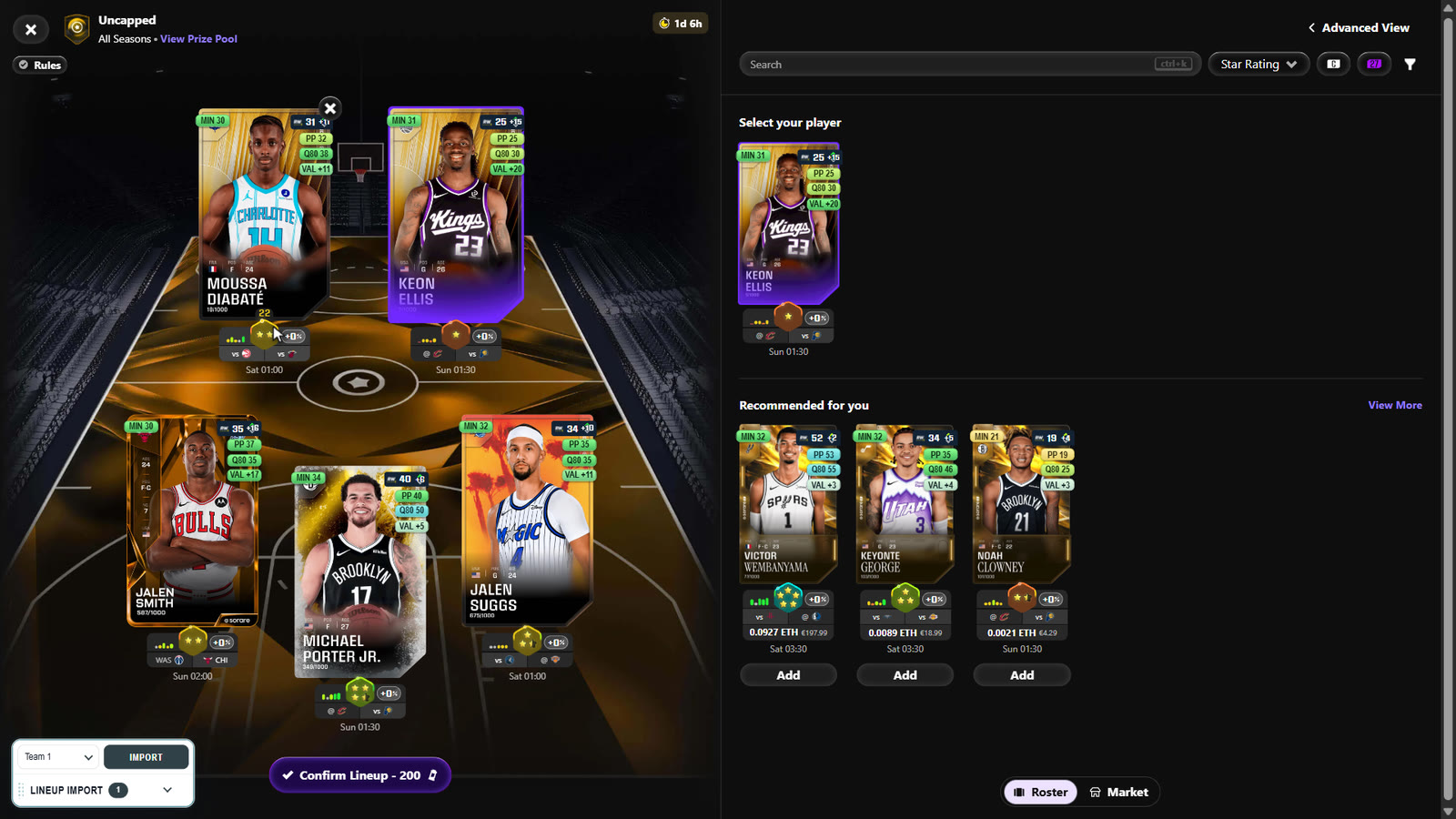
- Build and save a team in the NBA Lineup Builder for one competition and rarity, for example Arena Uncapped Limited.
- Open the same competition's lineup page on Sorare. The import panel at the bottom left lists the teams you saved for it.
- Pick a team and press Import. The extension finds each card of the team on the page and puts it into the lineup.
- It never submits anything: check the lineup and submit it yourself on Sorare.
- A team you have already entered on Sorare carries a check mark in the panel, an exclamation mark when some of its cards already play in a different Sorare lineup.
The popup: Football and NBA
- An account with Football and NBA gets a switch at the top of the popup. It opens on the sport of the Sorare page you have open, otherwise on your last choice.
- Under NBA each value has its own switch: Minutes, PP, Q80 and Value.
- An account with one sport sees only its own settings.
Who gets it and how to update
- Every account with NBA access gets the NBA values and the import; the football values stay as they were.
- The update is version 0.1.62. The popup shows the download: unzip it into your extension folder, replacing the old files, press Reload extension in the popup and refresh Sorare.
Start here:
- Open the popup and check that it shows version 0.1.62.
- Open Sorare's NBA market and look at the cards.
- Save a team in the NBA Lineup Builder and import it on Sorare.