Lineup Builder QOL Update 2:Import from Sorare, Build All Teams and a Grouped Context Bar
The Lineup Builder now imports your teams from Sorare, fills every team in one run with Build all teams, sorts its actions into labelled groups, keeps your Auto Builder settings for the next gameweek, shows prices in the football Pro builder and offers P90% as an optional column.
The second quality-of-life update for the Lineup Builder. It works in the Pro, Set and NBA Lineup Builder alike; P90% is football only.
Import your teams from Sorare
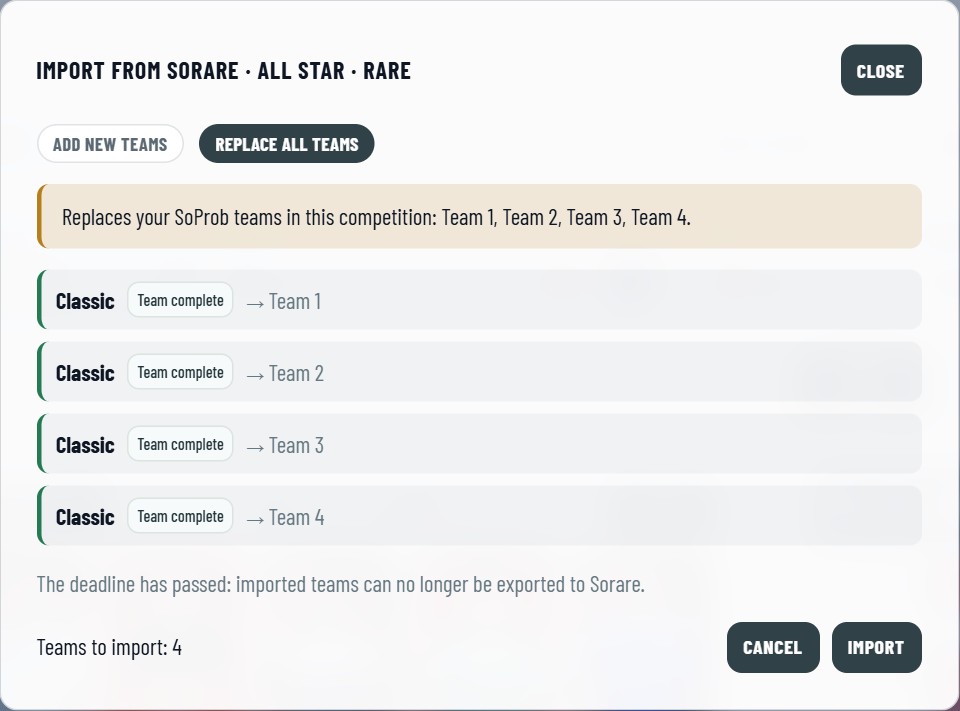
The new import button sits in the Sorare group of the context bar. It reads your teams of the chosen competition, gameweek and rarity at Sorare and shows each one before anything changes.
- Every Sorare team has its status: Team complete, Empty slots, Already in SoProb, or Skipped when a card is already in use or the team limit is reached.
- Add new teams is the default: your SoProb teams stay, and the Sorare teams come in as new teams.
- Replace all teams swaps your SoProb teams of this competition for the Sorare ones. It names the teams it replaces, needs a second click, and Undo brings yours back right after the import.
- Sorare drafts come in only when you tick Include Sorare drafts.
- A card SoProb cannot place leaves its slot empty and is named, for example a card that is not synced yet or a game outside your From / To dates.
- The import places your own cards, so the Player Pool must be My Gallery. In the Set Lineup Builder it reads the lineups of your open Set step.
Build all teams
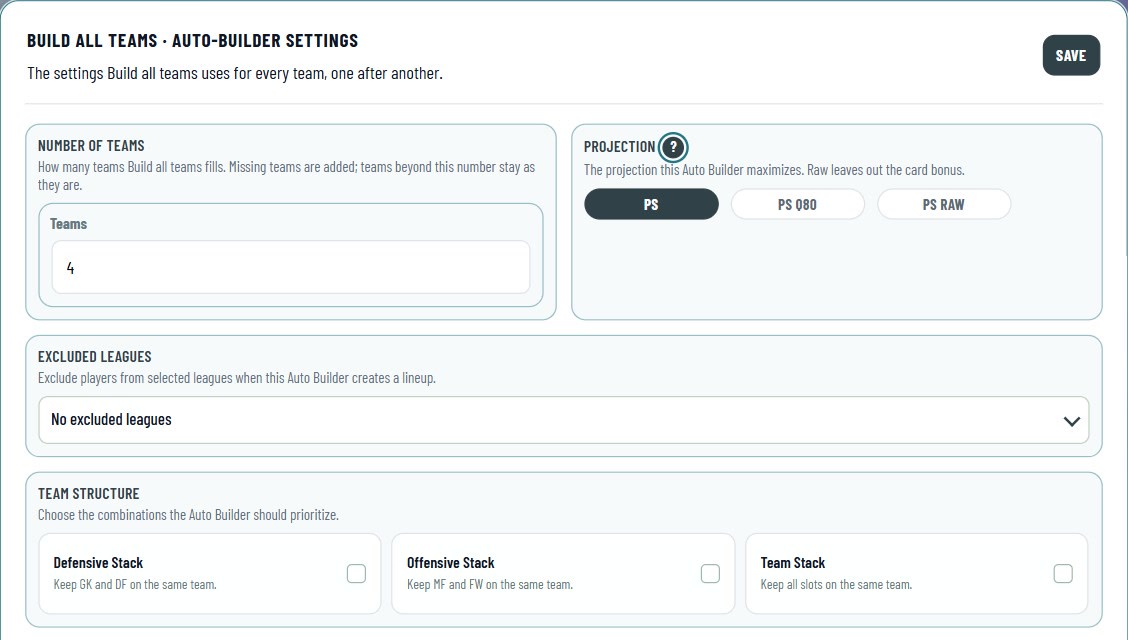
Build all teams in the Auto Builder group fills every team one after another, Team 1 first.
- Its gear holds the Auto Builder's choices for the run and the Number of teams. Teams missing up to that number are added, and removed again if the run cannot fill them. Teams beyond it stay as they are.
- Players you placed yourself stay; the run fills the empty slots, and a card an earlier team took is not used again.
- A team the run cannot fill stays as it is and the run goes on. The summary names what became of each team, for example not enough cards or below the minimum points.
- Stop after this team ends the run early. Undo puts the whole board back while it still holds the run's result.
The context bar in groups

The context bar keeps your choices on the left and the actions on the right, each group with its name:
- Sorare: import your Sorare teams, and export finished teams to the boards Sorare's lineup import takes (in NBA the Champion and Contender boards; the Set Lineup Builder imports only).
- Auto Builder: Build all teams and its settings.
- Teams: add a team and clear all teams.
Your Auto Builder settings carry over
The Auto Builder settings belong to a gameweek's lineup, a team's own settings as well as those of Build all teams. A new gameweek starts with the settings of your last saved lineup in the same competition and rarity, so you set them once per competition and they follow you from week to week.
Prices in the football Pro Lineup Builder
With All Players, the football Pro Lineup Builder now has the Price column of the NBA Lineup Builder: the In-Season price above, the Classic price below, in the board's rarity and your currency, as floor or last sale (Price Type). A floor opens the cheapest card on Sorare. The column shows only with All Players.
P90%: the chance of 90 points
Football only: next to P70% and P80%, the tables can show P90%, the chance of a score of 90 or more.
- P90% starts hidden. Show it in Display Settings among the table columns, and it stays shown.
- Where P80% has no value, P90% has none either.
Smaller improvements
- The builder's guided tour shows the new groups, Build all teams and the Sorare import.
- On the tabs with column filters, the tours point to the funnels in the column headers, which open the same filters.
Start here:
- In the Sorare group of the context bar, click the import button to bring your Sorare teams in.
- Set Number of teams in the gear next to Build all teams, then build them all in one click.