NBA Injury News:Every Update in the Injuries Tab, with the Backups Beside It
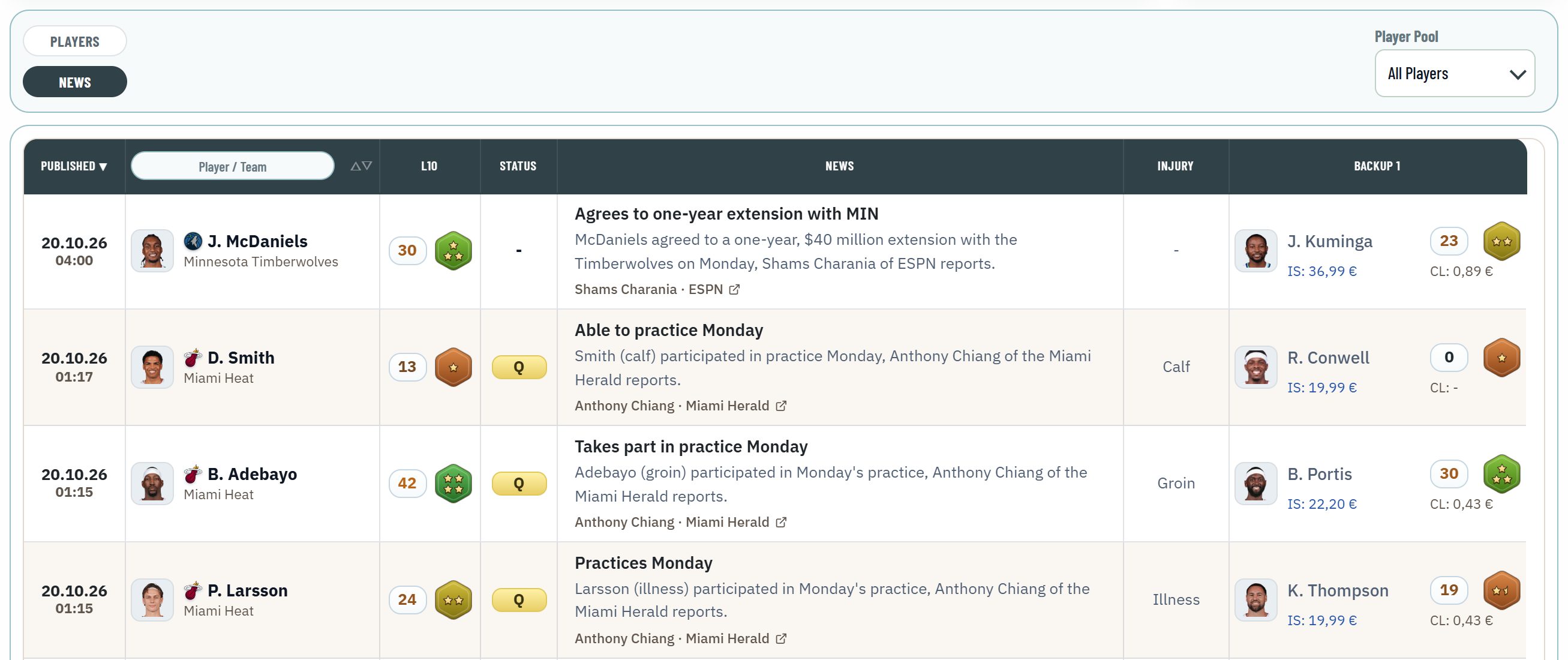
NBA Injuries has a second view: News. Every injury update of the last seven days, newest first, with the player's current status, the original report and the backups who step in.
NBA Injuries now has two views. Players stays as it was: everyone on the injury report with status, return and backups. News is new: every injury update of the last seven days as a feed, newest first, so you see what changed before you set your lineups.
Players or News: one switch
- The switch sits in the context bar above the table, next to the Player Pool.
- Players lists everyone on the current injury report, as before.
- News lists every update of the last seven days, newest first.
- Each view keeps its own columns, so a change in one never moves the other.
What a news row shows
| Column | What it shows |
|---|---|
| Published | When the update came out, in your time zone |
| Player | The player and his team, with a ring for the cards you own |
| L10 | His L10 with his gameplay stars |
| Status | Where he stands on the injury report right now; a dash when he is not on it |
| News | Headline and text, below them the original report: journalist and outlet, linked to the post or article |
| Injury | The injury or the reason named with the update |
| Backup 1 | Who steps in, with L10, stars and the cheapest In-Season and Classic card |
Backup 2 and 3, Position, Team and Conference can be shown under Display Settings.
Always current
- SoProb checks for new updates every 30 seconds, and the open News view reloads itself just as often, so a new update shows within about a minute.
- Status always follows the latest injury report. Next to an older update it shows you where the situation stands now.
- The table keeps its rows while it reloads: nothing jumps and your filters stay in place.
Find what matters to you
- Search: the search in the Player column finds players and teams, and also the headline, the text and the reporter of an update. Type practice, and you see every practice note.
- Filters: Status, Position, Stars, Conference and Team narrow the news like the players, right in the column header or in the Data Filters.
- My Gallery: switch the Player Pool to My Gallery to see only updates about players you own.
How I use it
- Before a deadline I open News and read the updates since my last look.
- A Questionable or Out next to a starter sends me to his Backup 1: L10, stars and card price show at once whether he is worth a spot.
- With My Gallery I check whether an update touches one of my lineups.
Start here:
- Open NBA Injuries and press News in the context bar.
- Switch the Player Pool to My Gallery to see your own players.
- Search a team or a word like practice.