The SoProb Extension Now Comes Only from SoProb
Google has taken the extension out of the Chrome Web Store for good. If you installed it from there, switch to the download on the Extension page: it brings every feature and updates itself.
Google has taken the SoProb extension out of the Chrome Web Store for good. Its policy counts fantasy games with prizes, such as Sorare, as gambling, and the Store allows no extensions for them. A version you installed from the Store keeps running for now, but it gets no more updates.
The current version comes from the Extension page, as every update does.
Switching from the Chrome Web Store version
- Remove the Store version on chrome://extensions. Both versions share one ID, so Chrome keeps only one of them.
- Download the current version on the Extension page, unzip it into a folder you keep and load that folder with Load unpacked.
- Open the popup and connect your SoProb account once more.
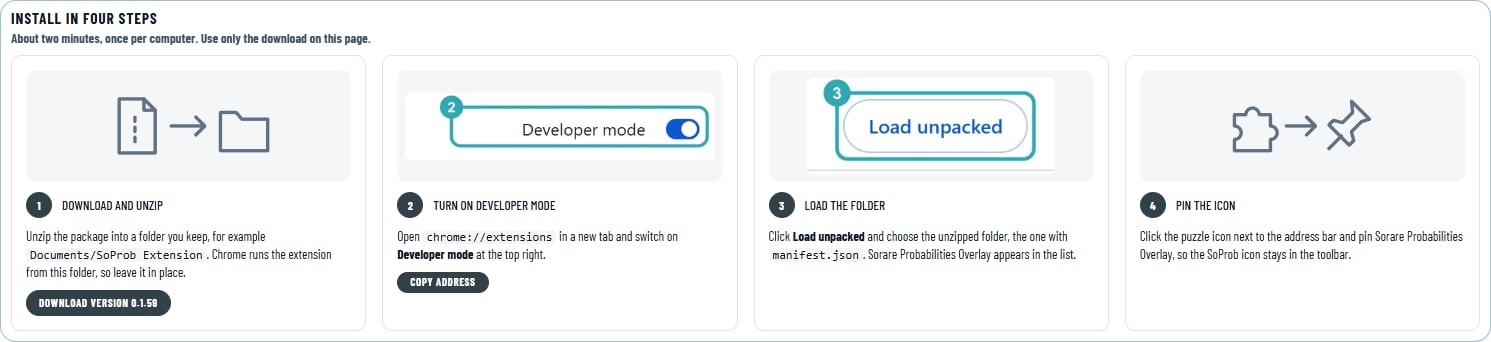
The installation takes about two minutes, once per computer. Chrome then warns about developer-mode extensions; keep the extension on, Chrome shows this for every extension loaded from a folder.
Updates in one click
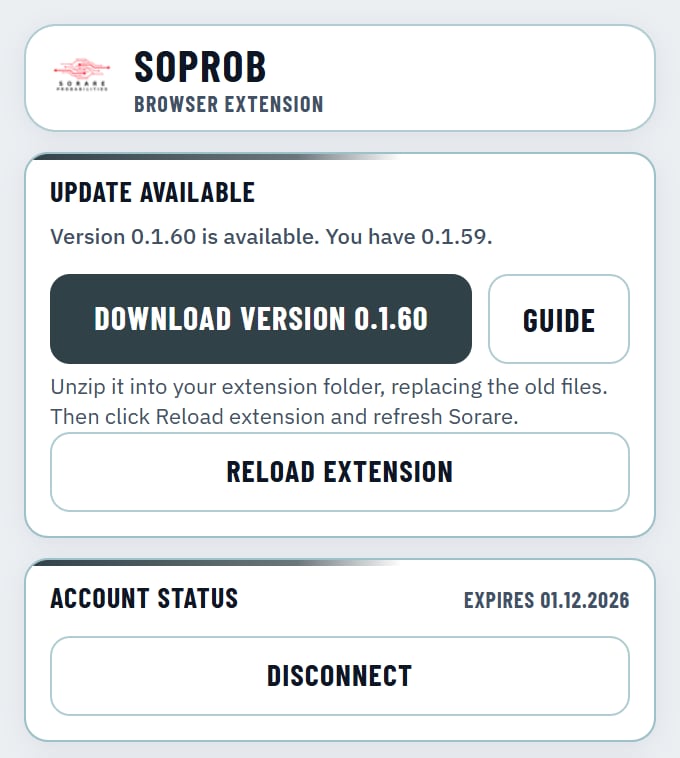
When a new version is out, the popup says so, with Download, Guide and Reload extension: unzip the new files into the same folder, click Reload extension and refresh Sorare. Your connection and settings stay.
Version 0.1.60: lighter on every page
- The values on the cards stay for five minutes instead of one; they change only a few times a day.
- A page asks for all its players at once instead of one by one, and open Sorare tabs take turns.
- After a refused or busy answer the extension waits, also when Chrome restarts it in the background.
The values themselves are the same as before.