NBA in the Match Center:Live Scores, the Starting Fives and Your Lineups
The Match Center now has NBA beside Pro and Set: every game of the gameweek live, both expected starting fives on the court, every player's Sorare score with his box score, and the lineups you submitted with their live rank.
The Match Center now covers NBA. One switch next to Pro and Set opens the NBA games of the gameweek: live score and quarter, both expected starting fives on a court, every player's Sorare score with his box score, and the lineups you submitted with their live rank.
Pro, Set and NBA: one switch
- The switch sits in Game Select, next to Today: Pro, Set and NBA.
- An account with NBA only opens the Match Center in NBA right away.
- The link /dashboard/matchcenter/nba opens NBA directly, and the address follows the switch.
Game Select
- The day tabs show the games of one day in your time zone, the arrows move between gameweeks, and Today jumps to the games of today.
- Each game shows the live score and the quarter once it has started, before that its tip-off time.
- Below a game sit the avatars of the players you own in it. A pin keeps a game at the top of the list.
- Match Status shows live, upcoming or past games; View narrows the list to the games of your own players.
The court
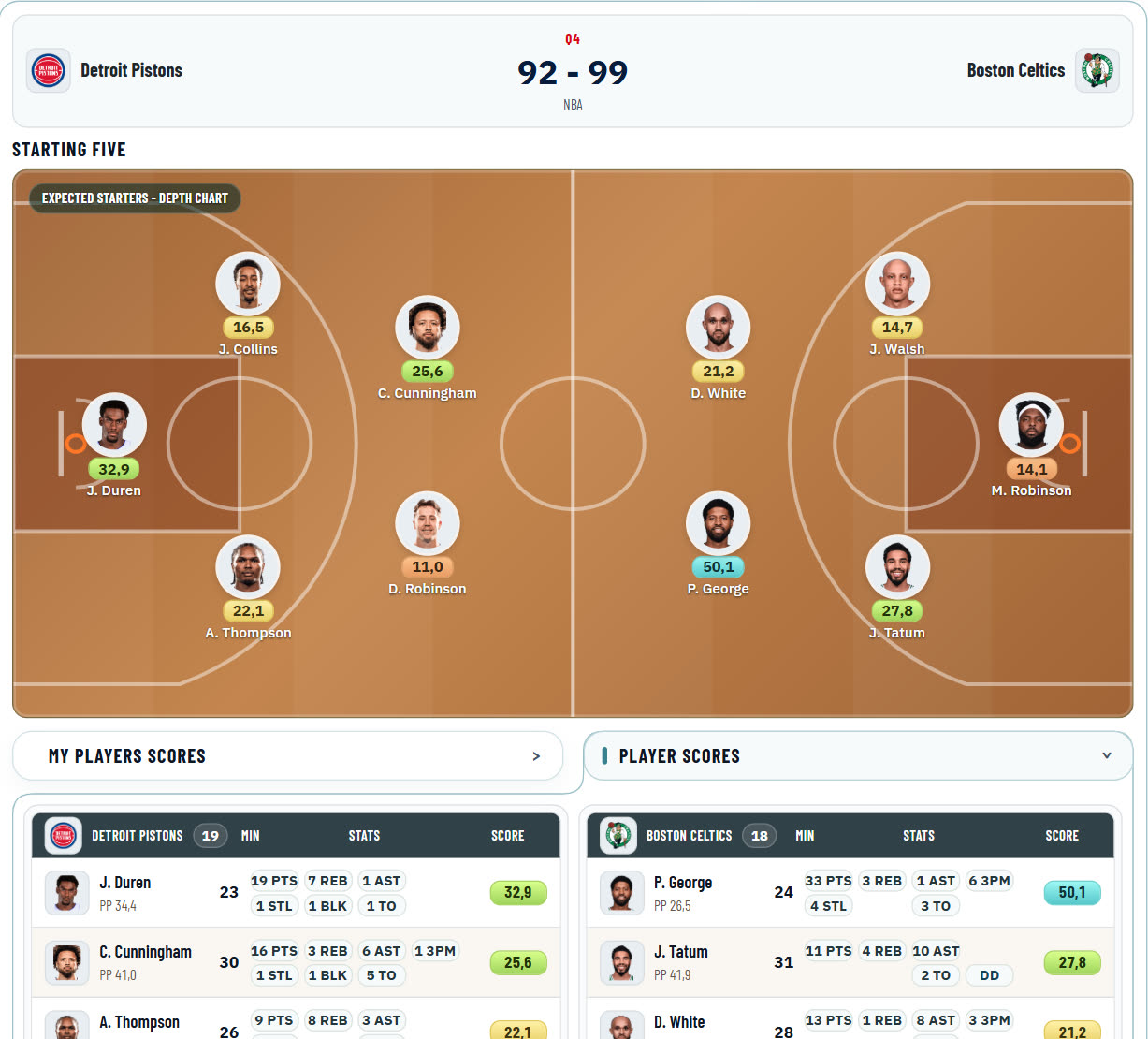
- Under the scoreboard both expected starting fives stand on a court: point guard, shooting guard, small forward, power forward and center of each team.
- The starters come from the depth chart. For a game still to come, a player the injury report rules out steps aside and the next one in the order takes his spot.
- Before tip-off each starter shows his projected points (PP), from tip-off his live Sorare score.
- A click on a player opens his box score.
Player Scores and the box score
| Column | What it shows |
|---|---|
| Player | Name and avatar, a ring for the cards you own, his PP for this game below the name |
| Min | The minutes he has played |
| Stats | Every stat in its fixed place: points, rebounds, assists and three-pointers above, steals, blocks, turnovers and a double-double or triple-double (DD, TD) below; points, rebounds and assists always, the rest once he has one |
| Score | His Sorare score: a dash before he plays, DNP after the game if he did not play |
- Player Scores lists both teams, highest score first, before tip-off by projected points. My Players Scores lists only your own players in this game.
- A click on a row shows his box score: every stat with its value and what it adds to his score.
- The games of the day refresh every 30 seconds while one of them is on or tips off within 90 minutes.
Your lineups
- A player who stands in one of your submitted lineups carries a ring on the game card. Hover over his avatar, or tap it on a phone, and the lineup opens: its competition and rarity, Sorare's live rank and score, and every card of it.
- Each card shows Sorare's own score of that card in the lineup, so the cards add up to the lineup's score. Before the player's first game the card shows his tip-off; NG means he has no game this gameweek.
- While a game of the gameweek is on, the lineups refresh every two minutes. They need your connected Sorare account.
Colours like on Sorare
The NBA scores follow Sorare's own NBA colours, here and in the Player DB and the Lineup Builder for PP:
| Colour | Score |
|---|---|
| Red | Up to 4 |
| Orange | 5 to 14 |
| Yellow | 15 to 24 |
| Lime | 25 to 34 |
| Green | 35 to 49 |
| Turquoise | 50 to 74 |
| Pearl | 75 and more |
How I use it
- During a game day I keep the NBA Match Center open on the live game and watch the starters' scores on the court.
- A ring under a game tells me one of my lineup players is in it; a hover shows where the lineup stands.
- Before tip-off the court's PP shows me at a glance who is expected to start and what he is projected to score.
Start here:
- Open the Match Center and press NBA in Game Select.
- Pick a live game and open Player Scores.
- Hover over a ringed avatar to see your lineup.