Lineup Builder Update:Cards in Use, a Points Minimum and Each Player Once per Competition
The Lineup Builder now shows which of your cards already play in another lineup and where, the Auto Builder sets a team only when it reaches your points minimum, can use each player once per competition and takes the starting goalkeeper's club mate as substitute keeper, and the filters gain Projected AA.
The Lineup Builder got a round of new options. They work in the Pro, Set and NBA Lineup Builder alike, except the goalkeeper and AA parts, which are football only.
See where your cards already play
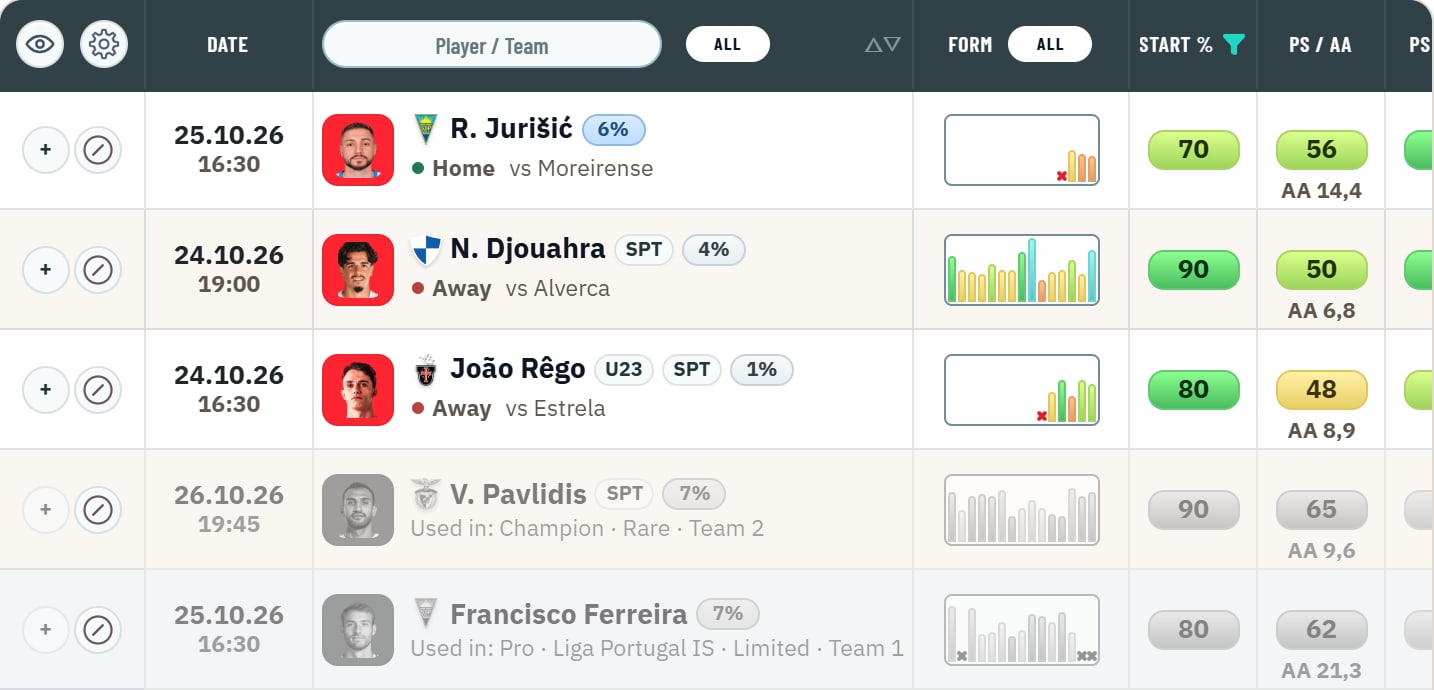
A card plays one lineup at a time. Until now the builder left such cards out of the list without a word, so a card you own could seem to be missing.
- Cards that another lineup holds now stay in the list: greyed, at the end, and with the lineup that holds them in place of the venue line, for example "Used in: Champion · Rare · Team 2".
- A card in another team of the same competition reads "Used in: Team 1". A lineup in the other mode starts with Pro or Arena, a lineup of another gameweek with its GW.
- The competitions read as in the competition menu.
- You cannot add a used card, and the Auto Builder never takes one. To use it here, take it out of the lineup that holds it.
The eye: choose what the list shows
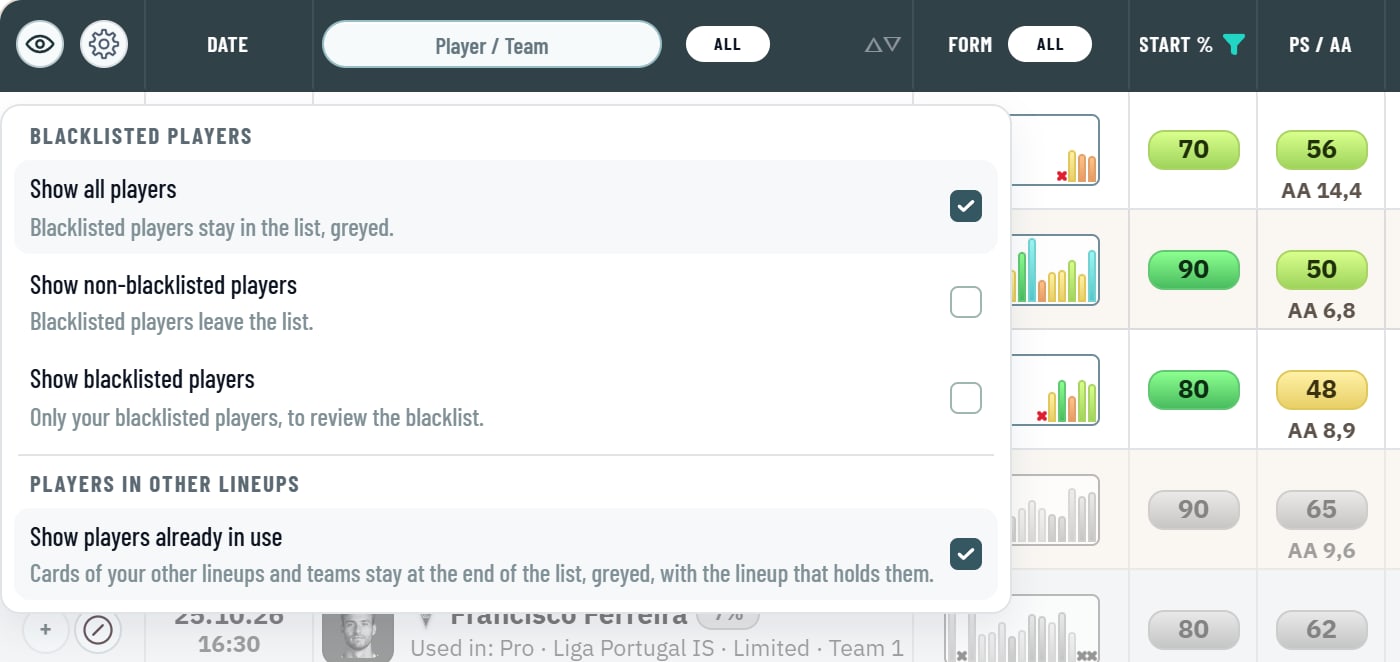
The eye in the header of the candidate list now opens a menu instead of switching on every click:
- Blacklisted players: Show all players (blacklisted ones stay greyed), Show non-blacklisted players, or Show blacklisted players (only them, to review your blacklist).
- Players in other lineups: Show players already in use. It is on by default; switch it off and used cards leave the list as before.
- Your choice is saved with your builder settings and follows you to every device. The gear next to the eye still sets the blacklist mode: a single card or all cards of a player.
New Auto Builder settings
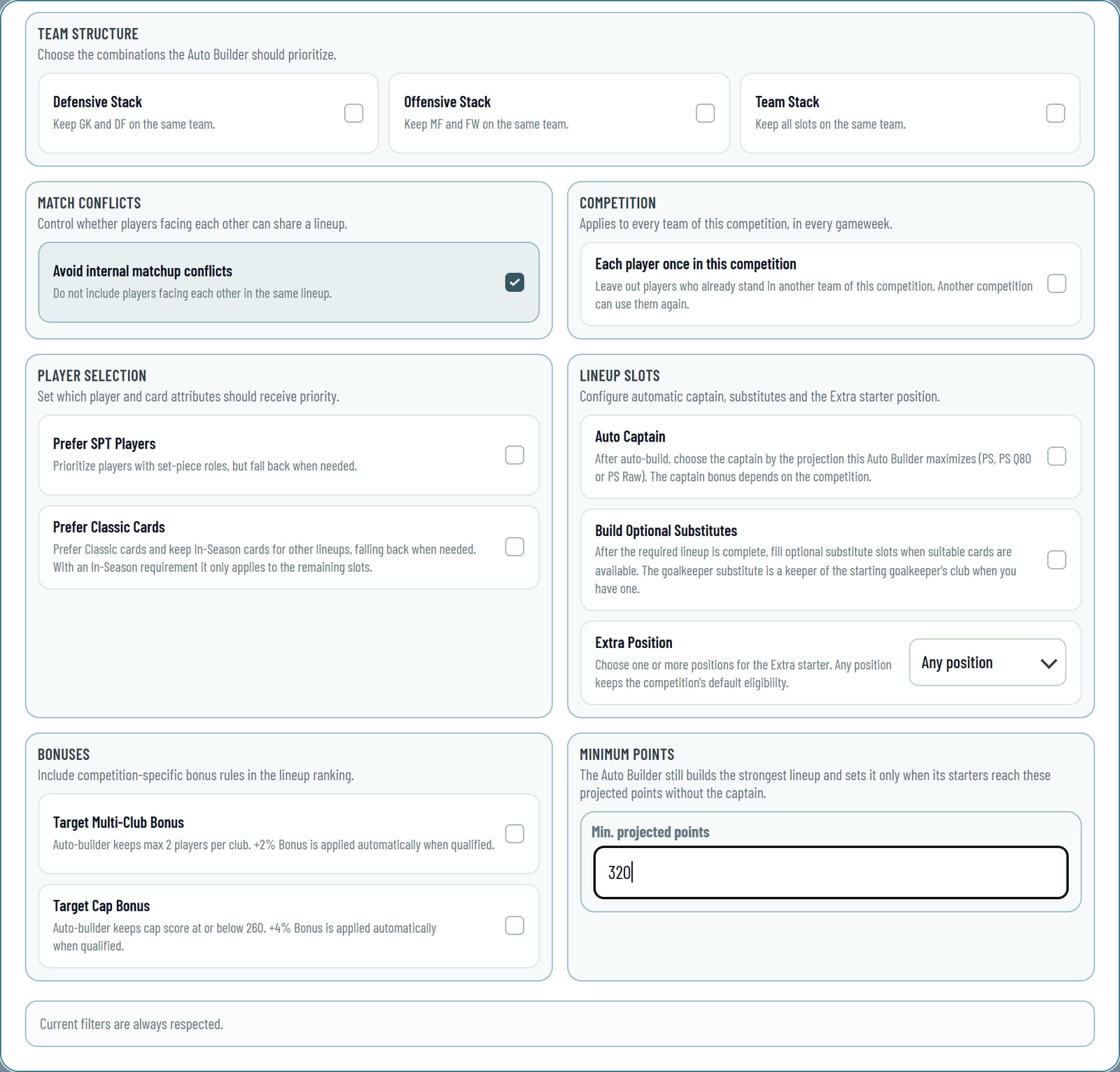
Open them with the gear next to a team's Auto Build button.
- Minimum Points. Enter the projected points a team must reach without the captain. The Auto Builder still builds the strongest team it can; when its starters stay below your minimum, it sets nothing and tells you what the best team reached. It counts the starters in the projection you build with (PS, PS Q80 or PS Raw), with the competition's team bonuses when the team qualifies. Leave the field empty for no minimum.
- Each player once in this competition. The Auto Builder leaves out players who already stand in another team of this competition, so every team gets other players. It holds for every team of the competition in every gameweek, each rarity on its own, and another competition can use the same players again. Players you place yourself are not limited.
- The substitute goalkeeper from the same club. With Build Optional Substitutes on, the goalkeeper substitute is a keeper of your starting goalkeeper's club when you have one: if your starter does not play, his club mate usually does. Without such a keeper it takes the best keeper, as before.
- PS Raw. Next to PS and PS Q80, the Projection setting offers PS Raw, the projection without the card bonus.
A new filter: Projected AA
In the football Lineup Builder and Set Builder, the gear of the Projected Score filter now offers Projected AA, as in the Player DB: pick it, and the slider keeps the players whose projected All-Around score reaches your value. The funnel in the PS / AA column shows Projected Score, PS Q80 and Projected AA one below the other; PS Q80 appears when your Preferences show both Average and Ceiling (Q80). Players without an AA projection stay in the list.
Smaller improvements since the last update
- The Auto Builder takes only players whose game is still to come, also while All Games shows the played ones.
- The blacklist button takes all cards of a player by default; the gear next to the eye switches it to a single card.
- The From and To date filters open a month calendar with a Today button.
- Filter markers and chips stay steady while the candidates reload.
- The Set Builder got the Pro builder's Auto Builder settings for the Extra position and excluded leagues, and stand-ins in All Players.
Start here:
- Open the Lineup Builder and click the eye to choose what the list shows.
- Open a team's gear and set a Minimum Points or Each player once in this competition.